How To Set Messages Within a Time Window
A user posed a question they had a text message smart plan between 8am and 10pm and didn’t want anything going out after 10pm because the first message was set to immediately. So how to prevent this and run these messages only during a specified window of time. There is a simple solution to do this right in the action step of the smart plan.
All right, so I set up a test smart plan just to show you visually what you can do. Again, you can do this right in Lofty. It’s super simple to do. So put your plan name, you put your buyer (your lead type), pick your scope. If you’re on a team or Enterprise account, make sure you select the My Plan Library, set your trigger newly created in the new lead pipeline.
Here are the actions. So in the immediate option, then 10 minutes, two minutes, 30 minutes. The auto text immediately between 8 AM to 10 PM. Second one, you’re going to wait 10 minutes and again, fire between 8 AM and 10 PM.
Wait two minutes after that again, fire between eight and 10. And lastly, wait 30 minutes fire between eight and 10. Put the timing to whatever it is. It doesn’t matter what it is. Eight to eight, 10 to 10, whatever you want. What’ll happen here in the logic is when the lead registers, if it is between these hours here, you set 8 a.m. and 10 p. m. It’s in YOUR time, not the lead’s time, this will fire out. So let’s say somebody registers at like 9:55pm. This text message will go out, because it’s still within that window.
So 9:55pm registration, immediate text goes out. This second one will not fire until 8 o’clock the next morning. Then the rest of the campaign will fire on that same day, basically on day two. So you’re not going to get anything after 10 p. m. It will wait until this previous step is compliant with these settings here.
So if somebody registers at 9 55 p. m. This goes out immediately. This is going to be past 10. Now we’re at 10. 05. This is set to go up between 8 and 10. So this step will not fire until 8 a. m. The next day. And then the campaign will continue. So when this, when step two fires, then the timing will start for step three.
So two minutes after this is sent, it’ll fire between these hours. That’s all you got to do. It’s really simple. The immediately step and the wait step both have this within the window. Just use that window, set your timing and you’re fine.
If you have any questions on this topic, comment below and I’ll be happy to answer.
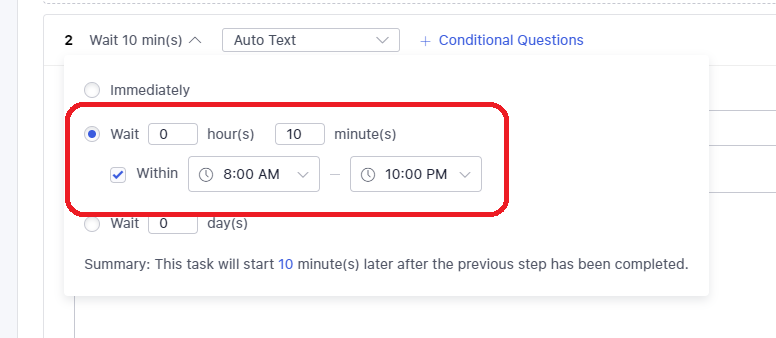
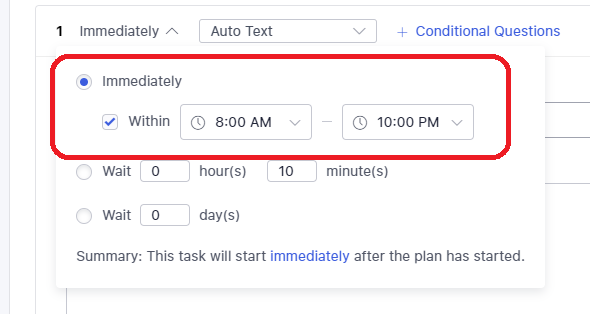
In the screenshot on the left, this option is available in the “wait” option of the timing section. In the screenshot on the right, this option is availabe in the “immediately” option of the timing section.
Interesting analysis! Seeing more platforms like kkkk ph legit enter the PH market is a game changer. Competitive odds & easy access via apps are key-players want convenience & value, right? Solid insights here!
It’s fascinating how gaming platforms are finally prioritizing player wellbeing – a real shift! Seeing resources like those at phtala games, with their focus on mindful play & self-assessment, is encouraging. Responsible gaming needs to be built-in, not bolted on!